How do you solve the problem of bad Terraform state and deployment management?

Terraform is a tool used to manage cloud resources like VMs, storage, and networks. If you’re deploying applications, you’re probably using Terraform—or something like it—to avoid the nightmare of configuration drift. You define your infrastructure as code, and Terraform makes sure what you say should exist actually does exist. Simple enough.
At the heart of it all is the state file—a record of what Terraform thinks your infrastructure looks like. It tracks everything: what exists, what’s been updated, what needs to be changed. Most teams store it in a backend like S3, GCS, or Azure Blob Storage so multiple people can collaborate without blowing up the system. But once you understand what the state file does, the real question becomes: how do you organize your Terraform code and state for sanity, scale, and speed?
Let’s walk through the most common strategies—and why most of them suck.
Option 1: The Mega State File (a.k.a. the Monolith)
This is the default: one massive state file that contains everything—every VM, bucket, network rule, DNS entry. At first, it’s great. Easy to manage. It “just works.” But very quickly, it becomes a nightmare. Every terraform apply locks the state, so when someone else wants to make a change, they’re stuck waiting. And if your apply fails? You’ve now blocked the whole team. This turns into a state file traffic jam, and you’ll be praying your pipeline doesn’t freeze during crunch time.
Some teams try to manage the pain by layering on tools like Atlantis to automate plan and apply in pull requests. It helps enforce process and keeps things a little more stable—but it doesn’t fix the root issue. You’re still locking the same giant state file every time. Atlantis just makes the traffic jam more orderly. It’s like adding traffic lights to a single-lane road—better, but still congested.
Option 2: One State File Per Resource (a.k.a. Copy-Paste Chaos)
This is the polar opposite approach. Each resource—literally every VM, function, or storage bucket—gets its own Terraform directory and state file. Now, nothing blocks anything else. That sounds good… until you realize the maintenance burden. Every tiny change needs its own CI/CD pipeline. You end up copy-pasting boilerplate just to add a single new resource. It’s clean on paper, but wildly overkill in practice.
Tools like Terragrunt can help reduce the repetition. They let you define shared inputs, backend configs, and provider settings once, and reuse them across many small Terraform projects. In theory, this makes things modular and scalable. And with strict conventions and clean folder structures, it can work well.
But—and this is a big but—I’ve been down this path. Like the dark side in Star Wars, it feels powerful at first. You move fast. You deploy infrastructure like a wizard. But if you’re not extremely disciplined, things spiral. Without guardrails, you’ll end up managing a forest of tiny directories, each with its own CI/CD quirks. One misstep, and suddenly you’re debugging five broken pipelines at once.
You escaped the traffic jam—but now you’re dying by a thousand yamls.
Use this approach only if you’re ready to invest in solid architecture, enforce strong patterns, and commit to Terraform hygiene. Otherwise, what looked like freedom will become a slow, painful mess.
Option 3: Environment-Based State (a.k.a. Bottleneck 2.0)
This approach groups resources by environment: one state file for prod, one for staging, etc. It’s better than a monolith and less chaotic than per-resource. But it still breaks down as environments grow. Suddenly your prod state is managing 70+ resources—databases, load balancers, queues, networking, IAM. Congrats—you’ve got bottlenecks again. One broken apply, and now nobody can deploy to prod until it’s fixed.
To make this work long-term, you need to draw hard lines between shared infrastructure and application-specific resources, and split those into separate state files—even within the same environment. Tools like Spacelift or Atlantis can help enforce policies, approvals, and parallel execution, but you still need to modularize your Terraform code to keep changes scoped and fast.
Environment-based grouping isn’t bad—it’s just easy to overgrow. If you use it, be ready to split aggressively as complexity increases, or you’ll recreate the same traffic jam you were trying to avoid.
So what actually works?
The Best Approach: Volatility-Based Decomposition
This is where things click.
Don’t group your Terraform state by environment or by resource type. Group it by what changes together. That’s the core of volatility-based decomposition.
If a set of resources typically evolves together—say:
- a storage bucket where files are dropped,
- a serverless function that processes those files, and
- a database that stores the results—
Put them all in the same state file. They’re tightly coupled in behavior, so it makes sense to manage them as a unit. But they don’t need to live in the same state file as your global networking config or your IAM roles.
On the other hand, infrastructure that’s used broadly but doesn’t change much—like networking, monitoring, or shared resource groups—should be in their own isolated state. These are often changed by different teams, at different times, for different reasons.
Here’s an example of how this might look:
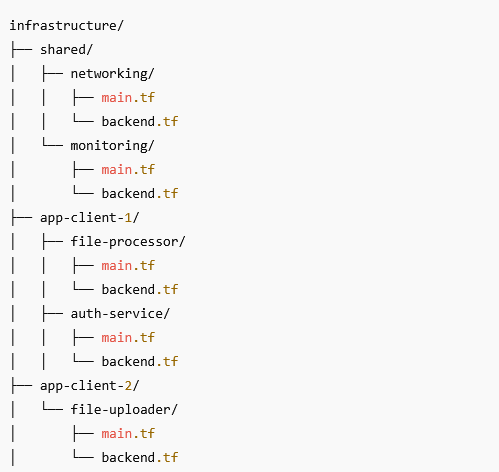
Each folder has its own backend.tf, which defines the remote state config (e.g., pointing to a specific GCS or S3 bucket path). You run Terraform independently per folder, either manually or through a CI pipeline. It’s fast, scoped, and avoids stepping on other people’s work.
You reduce blast radius. You cut down on conflicts. You only manage what matters—together.
And if you really want to level up?
God-Tier: VBD + Code Deployments
The ultimate setup is pairing volatility-based decomposition with your application deployments. Infra and app code live side by side in the repo—or in tightly coupled repos—and changes roll out together.
Your CI/CD pipeline applies the Terraform changes first. Once the infrastructure is up and confirmed stable, it deploys the application code on top. One commit. One rollout. Minimal drift. Maximum confidence.
Now you’ve got clean separation, safe changes, and fast pipelines. No traffic jams. No chaos. Just a system that scales.
🟢 Pros:
- Everything is in one place—infra + code in the same repo
- Easy to reason about full stack changes as a unit
- No external repo juggling or dependency management
🔴 Cons:
- Can be overwhelming for app developers who just want to ship code
- A failed
terraform applyblocks the whole deployment, even for minor app changes - Debugging infra issues can eat up valuable dev time if ownership isn’t clear
This setup works best when your team is ready to own both sides of the stack—or when you have clear separation of duties in the pipeline (e.g., infra verified before app code ever rolls out). Without that, you risk turning a quick bug fix into a drawn-out Terraform troubleshooting session.
Takeaway Checklist
- Avoid giant, monolithic state files. It’s a good start, but gets wild fast.
- Don’t go fully per-resource unless you love boilerplate for CI/CD
- Be cautious with environment-based grouping—watch for hidden bottlenecks
- Use volatility-based decomposition: group resources that change together
- Bonus: Tie infra deployments to code rollout for even smoother releases
Your Homework
If your Terraform setup feels slow, painful, or unpredictable—it’s not just you. Most teams struggle here. But you don’t have to settle for traffic jams or endless YAML boilerplate.
Take 15 minutes this week to audit how your state is structured:
- Are you using volatility-based decomposition?
- Are you stuck with one giant state file?
- Do your pipelines block each other for no reason?
Even small changes—splitting high-churn resources into their own state or cleaning up old modules—can make a big difference.
And if this helped you think differently about Terraform state, send it to your team or share it online. That’s how this stuff gets better for everyone.
Want to talk?
Like what you read? Hate what you read? Have a problem you want me to solve—or just want to talk about life?
💡Liked this post?
Get real-world solutions like this in your inbox—join the newsletter.